


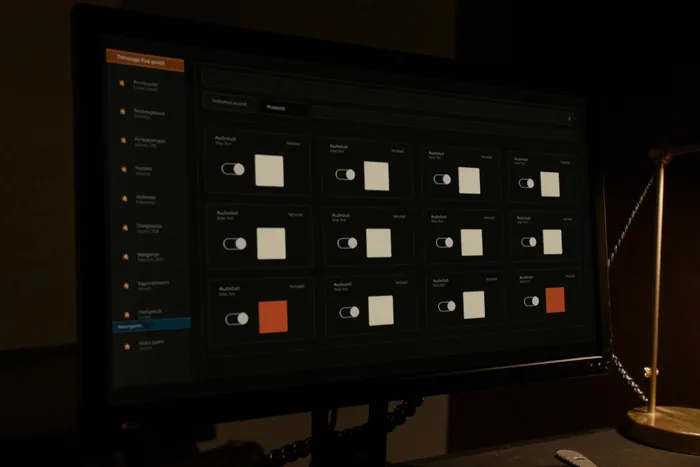
Approval gates
Approval gates that ship closed
Nothing external runs until a person opens the gate. Dry runs hold every outbound action for review unless explicitly permitted based on customer configuration; live use keeps the gates you agreed.
IAI to run your Business World
AI Automation
CoreShift’s AI automation gives one back-office workflow to a bot that runs it end to end. Missing documents, payment reminders, tasks? A request or approval waiting for review. Set the degree of automation, stipulate the rules for what is performed automatically and what needs your approval. You maintain control.
IIWhat we automate
Workflows that touch your customers, prospects, and partners. These bots represent your business externally: answering and routing what comes in, qualifying it, and handing warm replies to a person.
Internal-facing workflows. The bots your team interacts with, reception, scheduling, HR, executive support, facilities, and the Project Coordinator, which reconciles two systems into one monthly package per project manager.
Higher-sensitivity workflows. These bots get extra isolation by default, dedicated database connections, stricter audit retention, mandatory human approvals on financial actions over configurable thresholds.
Try it
The jobs people actually hand over, each one a scripted exchange you can walk a step at a time. 6 workflows, 30 steps. Nothing is sent, no account is connected and the figures belong to the sample, but the shape of the exchange, and the point where it stops and waits for you, are the real ones. For monthly reporting, see the Project Coordinator at the end of this page: that one produces documents on a schedule from every system of record, and is conversational for ad hoc reporting and job figures.
Sample data throughout. What your bots may do without asking, and what always waits for a person, is set in your scope, not here.
Three more assistants, built and deployed
Three conversational assistants delivered since the company’s inception, each over a system we had already built or connected. The pattern is the same every time: plain-language questions get real answers from the live data, and anything that changes a record is proposed first and confirmed by a person.
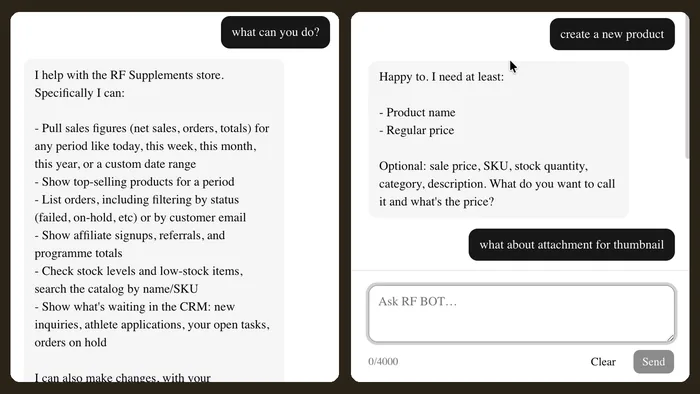
Ecommerce support · RF Supplements
It sits on the RF Supplements operations CRM and reads the same WooCommerce records the screens do: orders, products and stock, shipping, contacts and inquiries, affiliates and the athlete program. It covers two separate ecommerce sites, the public retail shop and a private business-to-business ordering portal, and keeps them apart, because a trade order and a retail order are not the same question.
Ask it in plain language. Sales for any period against the period before it, what is low or out of stock, where an order has reached, which affiliate a referral came through. It also writes: update a stock count, create a product, or set up a subscription so a repeat order is placed on a schedule.
Answers are the store’s own figures and records, the same ones the operations dashboard shows, because it is reading the same shop rather than a copy kept beside it. When a product name is ambiguous it says so and offers the one it thinks was meant, instead of picking one and being confidently wrong.
Nothing is written until a person says yes. Asked to change stock on a product it cannot find, it reports that, proposes the closest match, and asks which size and what quantity before it touches the record. Reading is free; every write is a proposal with a confirmation step in front of it.
Runs inside the operations CRM, over both of the store’s ecommerce sites.
Read the RF Supplements bot caseMember services · Baig Medical Group
It watches the Baig Medical Group website and the membership CRM built over it, and answers from the records those hold: members and their contact details, the plan somebody is on and what it still covers, the calendar, and the services already logged against a membership. Membership records only, no clinical detail is held in it, reported by it, or asked of it.
Ask who a member is and what their plan still entitles them to this period. Book an appointment, move one, cancel one. Log a service delivered against a membership, so the entitlement count stays right without anybody reconciling it later. Create a record for somebody who is not in the system yet.
It runs on the CRM site itself as well as in Telegram, so a lookup happens in the same window as the record rather than on a phone beside it. Either way the reply is the member’s own record and what is left on their plan, in a sentence rather than a screen to go and read.
It confirms before it touches anything. A booking, a move, a cancellation or a logged service comes back as a proposal and is written only once a person approves it. It is operator-only: the practice’s own staff use it, members never talk to it, and nothing it reports reaches past the membership.
Built and deployed for Baig Medical Group. It runs on the CRM site and on Telegram, operator only, and records what was delivered against a membership, never a clinical detail.
Read the membership CRM caseOperations assistant · DiegoTech
A conversational front end for DiegoTech Operations, reachable inside the application and from Telegram. It reads the live operations database, tickets, customers, projects, quotes and invoice history, and the time, mileage and expense entries behind them, which is the same data the dashboard, the dispatch board and the billing screen show.
Ask what is open, who a customer is, what a quote covered, what has not been billed yet. Then ask it to do the work: log time, mileage or an expense against a ticket, correct an entry that has not been invoiced, create a lead, customer, quote or project, or turn an accepted quote into a project.
Figures come out of the database at the moment of asking, not from a store of answers kept alongside it, so a number it quotes is the number the application shows. Anything it intends to write comes back first as a card naming the record and its fields, in the same application the change will land in.
Every statement runs as the signed-in user, so the application’s own permissions, not the assistant’s judgement, decide what it may see or change. It cannot be talked into more access than the person already has. And it writes nothing at all until they confirm the record it has proposed.
Built and deployed for DiegoTech, inside app.diegotech.com and on Telegram. Every statement runs as the signed-in user, so the application’s own permissions decide what it may see or change.
Read the DiegoTech Ops assistant caseThe automation inside the field-service application built for Auto Solar Service. A fault on a monitored solar system becomes a technician on site without a dispatcher in the loop.

A fault from the monitoring platform on a customer’s system arrives and is translated into one standard fault code, whichever manufacturer reported it.
The site’s zip code decides its service zone and the primary technician for it.
If the primary is not available, technicians in range are ranked by travel time and the work already on their day.
The job is scheduled and the technician is told by text and app notification, with a window to accept before it moves to the next person.
Arriving inside the site’s geofence starts the labour clock, so the time on the invoice is recorded rather than typed.
Nobody approves each dispatch. This is the one automation on this site that runs without a person confirming every job: what it may do was set when it was configured, and every step lands on the record the office sees.
Built for Auto Solar Service. Precision Electric is the initial tenant.
IIIFour things every CoreShift bot gets
Approval gates
Nothing external runs until a person opens the gate. Dry runs hold every outbound action for review unless explicitly permitted based on customer configuration; live use keeps the gates you agreed.
Your data
Every customer gets a dedicated Postgres schema, scoped at the connection level. Every meaningful action a bot takes writes an append-only audit row you can review.
Security and data handling
Integrations
Email and Procore connections have been verified in production. Twilio, Microsoft 365, Google Workspace, QuickBooks and Sage are set up per account.
The technology page
Terms
Start with one bot. Add another when you're ready. Skip the ones you don't need. Volume discounts from the second bot.
Automation pricing
Automation
A bot can read the record, apply your rules and prepare the action. Which of those actions runs without asking you is a decision you make once, in writing.
IVWhat we make

What we make
A CoreShift bot isn't a chatbot or a copilot. It's a piece of software that owns a specific business workflow end-to-end, receiving inputs, doing the work, asking for human approval when stakes are high, and submitting the result.
Browse the catalog
Who it's for
A company of five to fifty people has the same paperwork as a company of five hundred and nobody whose whole job is doing it. So it lands on the owner, in the evening: the invoices that need chasing, the calls that went unanswered during job hours, the form nobody filled in. These bots are for that hour. They are not for replacing a back office you already have, they are for the one you never got round to hiring.
The model
Your data lives in your own database schema, with a hard tenant filter at the connection level. New bots ship by adding code, not by rewriting it, the shared foundation of database access, audit logging, secret management and signature verification is reused by every bot. You only pay for the bots you actually run: 12-month term, no setup fees.
See the architectureA new inquiry needs an owner, useful details, and a response path. Scope what to collect and where to send it, using the channels agreed for your business.
Prepare the reminder, collect the invoice details, or flag a mismatch. Define who reviews the proposed action before money-related decisions or external messages go ahead.
Ask for the missing attachment, prepare a review packet, or prompt the person holding up the next step. Start with a task you can show us from beginning to end.
An incoming message, a scheduled check, or a record change. We define which inputs belong in scope.
Read the allowed data, apply your rules, and record the proposed result.
Approval gates, missing information, and exceptions go to an agreed owner with enough context to act.
The permitted action runs and its outcome is logged. Failed steps remain visible for follow-up.
A bot cares about the shape of the workflow, not the industry it sits in, a quote that stalls looks the same in a clinic, a club and an electrical contractor's office. The cards below are a shortcut, not a category: each one names the kind of business, the bot worth starting with, what people usually add next, and what moves off someone's desk when it works. If your business is not listed, the question to ask is which of these workflows it recognises.

Trade contractors
Profile: 10–50 employees, owner-operated, $2M–$20M revenue. Principal spends nights and weekends on paperwork and AR chasing. Start with: AR to chase 60-day receivables on a steady cadence; Reception to catch calls during job hours when nobody can answer; the Project Coordinator for the monthly job-cost picture. Outcome to expect: AR follow-up and monthly reconciliation move off the principal's desk.
Trade contractors
Property management
Profile: 20–200 units, 2–10 employees plus contractors. Drowning in tenant texts, maintenance, rent inquiries, lease renewals. Start with: Property Manager, triages tenant communication, classifies urgency, dispatches vendors with photos and unit details, tracks completion. Add next: AR for consistent late-rent follow-up with an audit trail; Compliance for lease renewal calendars and inspections. Outcome to expect: requests get logged and dispatched instantly. Owner stays informed without being on-call.
Property management
Professional services
Profile: 3–20 partners or principals. Every hour spent on intake, scheduling, AR follow-up, or document review is a direct revenue leak. Start with: Sales Qualifier + AR, Sales Qualifier handles inbound and books fit-calls; AR chases overdue invoices politely and consistently. Add next: Contract Review for repetitive NDAs, MSAs, vendor agreements; Executive Assistant for senior partners drowning in inbox.
Professional services
Healthcare clinics
Profile: 1–5 providers. Dental, PT, mental health, optometry, urgent care, primary care. Front desk overloaded with calls, appointment changes and refill requests. For a clinic: the scheduling and reception assistant is built. It books and moves appointments for members and logs what was delivered, and clinical records stay in the clinic’s own system. Also: HR for clinic staff time-off and benefits questions.
Healthcare clinics
E-commerce and retail
Profile: solo founder or small team, selling on Shopify, Amazon, Etsy, or a single retail location. Customer service inquiries grow faster than the team can handle. Start with: Reception for inbound customer inquiries, order status, returns, shipping, availability. Standard scenarios automatic; unusual ones routed to you. Add next: Procurement for supplier RFQs and PO tracking; AR for B2B or wholesale invoice follow-up; Lead Generation for B2B expansion. Outcome to expect: the owner stops being the customer-service department.
Retail & commerceHow the pattern above applies to a grower, a packhouse or a shipper: the same platform, the same approval gates, and figures taken only from the records that hold them.
The schedule is the easy half. A workflow can hold the plan per block, valve or zone, compare it against what was actually run and what the meters say, and put a missed or short set in front of the person who decides, with the plan, the reading and the forecast it was written against, in one place. Changing a set stays a human decision. Noticing that one did not happen does not have to be.
Who is picking what, where, tomorrow, and who has been told. A workflow can assemble the day from the block plan and the crew list, draft the message each crew lead actually needs, and hold it for approval rather than sending it. When the day moves, the same record shows who has the old version and who has the new one, which is usually the part that goes wrong.
Product, rate, block, operator, date, wind and re-entry interval belong in one record written at the time, not reassembled from notebooks when somebody asks. A workflow can take the entry, refuse it while a required field is missing instead of guessing, and flag a re-entry or pre-harvest interval that conflicts with the picking plan. It prepares the return; the person responsible signs it.
Seed, fertiliser, chemical, packaging, fuel. A workflow can turn a requirement into quote requests across your existing supplier list, line the offers up in the same units so they can actually be compared, and track a purchase order through to what arrived. Which suppliers are asked, and which orders may be placed without a signature, are your settings rather than ours.
Lots in, grade-outs, pack-outs, what is committed and what is still on the floor, read from whatever already records it. Then the documents a load cannot ship or be paid without: certificates, inspection reports, passing details, the bill of lading. A workflow can chase the missing ones on a cadence you set and escalate the ones that are about to hold a truck.
An engagement would start by scoping one of these against the systems you already run. The fresh-produce side of this, grower and buyer records, purchase orders and passing details, and the documents behind a shipment, is set out on the agriculture page.
VHow we work on your automation
Map inputs, outputs, users, thresholds, and existing systems.
Agree the rules, access, approval owners, and alert destinations.
Use representative workflows with external actions held for review. Resolve exceptions before live traffic.
Move to live use with agreed monitoring, support, and a way to stop the workflow.
Automation engagements run for 12 months. You can cancel within the first month of your start date for any reason. After that first month, the term runs to completion. Website and application work is priced separately
and is not subject to this term.
There is no month-to-month option.
Catalog bot
$499
/ month per bot
Standard customer inquiry, office coordination and finance workflows.
Discuss a standard botCatalog bot
$799
/ month per bot
Document-intensive workflows. Included volume and additional action charges are agreed before activation.
Discuss a heavy botApproval gates
Dry runs hold every outbound action for review unless explicitly permitted based on customer configuration. Live use keeps the gates you agreed. The bid does not submit below your margin floor, and the redline does not send without the lawyer.
Shared Platform
Where data lives: your own Postgres schema on CoreShift infrastructure, in AWS US regions. You own your data, your configuration, your integration credentials, and a full export whenever you ask. This is the default, and it is what every bot runs on today.
Private Tenant
Where data lives: a dedicated database and dedicated compute, still operated by CoreShift. For workflows where “your own schema” is not a strong enough answer, finance, legal, anything with a compliance reviewer asking the question.

Client-Hosted, on request
Where data lives: on your infrastructure. You own the machine, the database, the network, and the operational burden. CoreShift owns the packaged bot, its updates, and the runtime that loads and runs it.
Deployment options in detailYes. Every bot in the catalog is built and ready for use. Each one is configured to your systems, your data and your approval rules before it acts on your records.
These are built and deployed for clients: the RF Supplements support bot over that store’s two ecommerce sites, BMG Monitor on the Baig Medical Group CRM, the DiegoTech Ops assistant inside app.diegotech.com, the Project Coordinator, which delivers job-cost and change-event packages to Precision Electric’s project managers, and the dispatch automation inside the Auto Solar Service platform, which turns a fault alert into a technician on site. The Club Coordinator is an existing product, configured per engagement, and every other bot in the catalog is built and ready to configure for your business.
Your scope defines approval thresholds, external actions, and exceptions. In the Club Coordinator, bookings and adjustments are flagged for management rather than confirmed independently.
Connected in production today: email through Gmail and Microsoft 365, Procore, Sage 100 Contractor (through an on-site bridge), WooCommerce stores, WordPress, Telegram, solar monitoring platforms such as SolarEdge and Enphase, and Postgres and MySQL databases.
What we connect to: accounting such as QuickBooks and Xero; calendars and mail in Google Workspace and Microsoft 365; payments through Stripe and Square; CRMs such as HubSpot and Salesforce; field-service and estimating software; text messaging; document storage; and any system that offers an API, a database connection or a scheduled export. Each connection your workflow needs is set up and tested with your accounts before it goes live.
Stopping, alerting, and escalation responsibilities are part of onboarding. A workflow should not continue silently when its inputs or permissions are wrong.
The platform uses tenant-scoped database access and action logging. Read the security and data-handling overview for the boundaries and current disclosures.
That question belongs in the design of a payment reminder workflow. It is why automation needs rules for the exceptions, not just a message template.
Identify the record to read and the conditions that make a reminder appropriate. Decide what to do when the information is missing or out of date.
Show the relevant details alongside the proposed message. Make the approval point explicit before enabling external actions.
If someone spots a mismatch, hold the action and give the agreed owner a way to resolve it. Define how the workflow resumes after that review.
Your accounting connection, checks, and approval rules are established during scoping and testing.
Step through the scripted payment reminderAutomation in practice
Precision Electric's project managers were assembling their monthly job picture from two systems that do not talk to each other, by hand, every month. This is the workflow that replaced that.
From a monthly run: packages for six project managers, sent from the contractor's own mailbox.
Job cost and billing from Sage 100 Contractor, through a read-only, outbound-only bridge on the contractor's own network, no inbound firewall hole, no VPN into CoreShift. Change events from the Procore API on read-only scopes, void and rejected ones excluded rather than quietly counted.
The two systems agree on nothing but the job number, so they are matched on that, and anything in one but not the other is reported rather than dropped. Projected cost, cost to complete and percent complete exist only at report time, so the engine computes them and labels every computed figure as computed. The four checks it then runs are the ones on the sheet below, each against a threshold set for this contractor.
Three documents for each of their jobs, bundled into one package per manager covering only their own work.
Where a person stays in control
Every computed figure is labelled as computed and is checkable against the report Sage already prints, and the first month's is being checked line by line against it before those numbers are trusted. A schema change in Sage halts the run loudly rather than shipping a wrong number quietly, and the send gate is the contractor's setting, not ours.
How an automation like this is scopedVITell us where the work gets stuck
The same form as the contact page, with this service already ticked. A few sentences are enough.
VIIWhat are you tired of working around
Let’s talk about the work
Show us the spreadsheet, the website, or the task you keep explaining. That’s enough to start a useful conversation. Start a project